Bible Verse Replacer 是一个常驻后台的小工具。写文章、讲章、笔记、Markdown 或聊天消息时,选中经文引用,按快捷键,它会把引用替换成离线内置经文。
当前版本:v0.1.12
下载
到 Releases 下载最新版:
- macOS:
BibleVerseReplacer-v0.1.12.zip,支持 macOS 13 Ventura 及以上。 - Windows:
BibleVerseReplacer-Windows-v0.1.12.zip,支持 Windows 7 SP1 及以上,需要 .NET Framework 4.8。
目前还没有 Apple 公证或 Windows 代码签名。macOS 如果提示无法打开,请在 Finder 里右键 App,选择“打开”。
第一次使用
macOS
- 解压
BibleVerseReplacer-v0.1.12.zip。 - 把
BibleVerseReplacer.app放到“应用程序”文件夹。 - 打开 App,菜单栏会出现一个“经”字图标。
- 按提示授予“辅助功能”权限。这个权限只用于模拟复制和粘贴。
- 在任意 App 里选中
创世记 1:1,按默认快捷键⌃⌥⌘B。
Windows
- 解压
BibleVerseReplacer-Windows-v0.1.12.zip。 - 运行
BibleVerseReplacer.exe,系统托盘会出现应用图标。 - 在任意 App 里选中
创世记 1:1。 - 按默认快捷键
Ctrl + Alt + Win + B。
可以怎么用
选中一个引用:
创世记 1:1
默认会替换为:
创世记 1:1 起初,神创造天地。
也可以选中整篇文章再按快捷键。程序会自动检测文章里的经文引用,只替换还没有正文的地方;如果引用后面已经有经文,就会跳过,避免重复替换。
例如文章里有:
今天读 创世记 1:1
这句已经好了:创世记 1:1 起初,神创造天地。
替换后会变成:
今天读 创世记 1:1 起初,神创造天地。
这句已经好了:创世记 1:1 起初,神创造天地。
支持的引用写法
常见写法都可以:
创世记 3:2
创世记 3:2-5
创世记 3:2,5,7-9
创世记 3:2、5,7-9
创世记 3:2-4:3
创世记第3章
约 3:16,罗 8:28
马可 5:8
陆家 2:10
Genesis 4:1
程序会自动兼容:
- 全角/半角冒号和数字。
- 逗号、顿号、分号、竖线、反斜杠等分隔符。
-、~、到、至、to、...、……等范围符号。创世纪会识别为创世记。- 四福音可写成
马太、马可、路加、约翰;陆家会识别为路加。
暂不支持中文数字和半节写法,例如 创世记三章二节、约 3:16上。
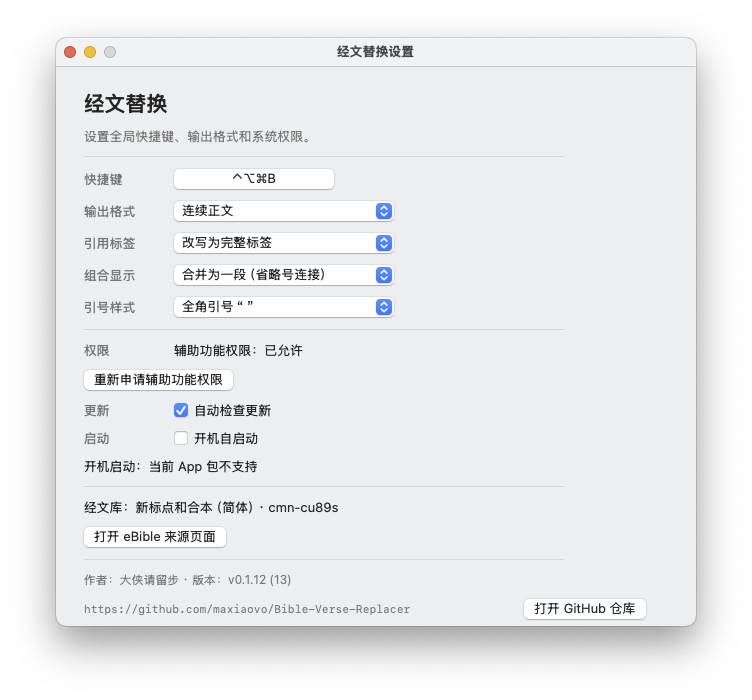
设置
点击菜单栏“经”图标或 Windows 托盘图标,可以打开设置。
可以调整:
- 全局快捷键。
- 输出格式。
- 是否保留、改写或隐藏引用标签。
- 多段组合经文是合并为一段,还是按片段分行。
- 经文里的引号样式:默认全角引号
“ ”,也可以改成半角引号" "或保留方引号「 」。 - 自动检查更新。
- 开机自启动。
设置窗口底部会显示作者、版本号和 GitHub 仓库地址。
如果 macOS 系统设置里“辅助功能”开关已经打开,但菜单里仍显示未允许,请点菜单里的“辅助功能权限:未允许,点击修复”,或在设置里点“重新申请辅助功能权限”。程序会清理旧版本留下的授权记录,然后重新打开授权页。
更新
默认会自动检查 GitHub Releases。发现新版本后,可以直接下载并自动安装;安装时会显示进度条,完成后自动重启程序。
如果你正在使用 v0.1.7 到 v0.1.9,并且自动更新提示下载临时文件不存在,请手动下载最新版覆盖一次。v0.1.12 修复了中文正文紧贴经文引用时无法检测的问题,例如 今天我读了创世记1:1。
离线与隐私
经文替换不需要联网。经文库已经离线内置在 App 里。
只有两种情况会联网:
- 自动检查更新。
- 你手动点击“检查更新”。
替换选中文字时,程序会临时使用剪贴板:复制选中文字、写入替换后的经文、粘贴回去,然后尽量恢复原剪贴板内容。
当前内置经文来自 eBible 的 Chinese Union Version (Simplified) / cmn-cu89s。
English
Bible Verse Replacer is a small background utility for replacing selected Bible references with offline scripture text. It is useful when writing sermons, notes, Markdown documents, essays, or chat messages.
Author: 大侠请留步
Current version: v0.1.12
Download
Download the latest release from Releases:
- macOS:
BibleVerseReplacer-v0.1.12.zip, macOS 13 Ventura or later. - Windows:
BibleVerseReplacer-Windows-v0.1.12.zip, Windows 7 SP1 or later with .NET Framework 4.8.
The app is not notarized or code-signed yet. On macOS, if the system blocks the app, right-click it in Finder and choose Open.
First Run
macOS
- Unzip
BibleVerseReplacer-v0.1.12.zip. - Move
BibleVerseReplacer.appto Applications. - Open the app. A “经” icon appears in the menu bar.
- Grant Accessibility permission when prompted. This is used only to simulate copy and paste.
- Select
创世记 1:1in any app and press⌃⌥⌘B.
Windows
- Unzip
BibleVerseReplacer-Windows-v0.1.12.zip. - Run
BibleVerseReplacer.exe. The app icon appears in the system tray. - Select
创世记 1:1in any app. - Press
Ctrl + Alt + Win + B.
How It Works
Select one reference:
创世记 1:1
The default output is:
创世记 1:1 起初,神创造天地。
You can also select a whole article and press the shortcut. The app detects Bible references inside the article and replaces only the references that do not already have scripture text after them.
Supported References
Examples:
创世记 3:2
创世记 3:2-5
创世记 3:2,5,7-9
创世记 3:2-4:3
创世记第3章
约 3:16,罗 8:28
马可 5:8
Genesis 4:1
The app accepts full-width and half-width punctuation, common separators, common range markers, Chinese book names, common Chinese abbreviations, English book names, and common English abbreviations.
Settings
Open settings from the menu bar icon on macOS or the tray icon on Windows.
You can change:
- Global shortcut.
- Output format.
- Reference label behavior.
- Combined passage display.
- Quote style: full-width
“ ”by default, half-width" ", or original corner quotes「 」. - Automatic update checks.
- Launch at login.
The settings window shows the author, version, and GitHub repository at the bottom.
If macOS System Settings shows Accessibility enabled but the app still says permission is not allowed, click “辅助功能权限:未允许,点击修复” in the menu, or click “重新申请辅助功能权限” in settings. The app clears the old permission record and opens the permission page again.
Updates
Automatic update checks are on by default. When a new release is available, the app can download and install it with a progress bar, then restart itself.
If you are using v0.1.7 through v0.1.9 and automatic update reports a missing temporary download file, please install the latest version manually once. v0.1.12 fixes detection when Chinese prose touches a Bible reference directly, such as 今天我读了创世记1:1.
Offline and Privacy
Bible replacement works offline. The scripture database is bundled inside the app.
The app contacts the internet only when checking for updates. Replacement uses the clipboard temporarily: it copies the selection, writes the replacement, pastes it back, and then tries to restore the previous clipboard content.
The built-in Bible text comes from eBible: Chinese Union Version (Simplified) / cmn-cu89s.